A free PDF toolkit that covers the basics
PdfCraft is a free, open-source productivity app for reading, organizing, merging, splitting, and securing PDF files. It runs locally on your computer, so you don’t need to create an account or upload your documents to the cloud to use its features.
PdfCraft focuses on making everyday PDF tasks straightforward while keeping your files private. It also emphasizes speed and reliable saving, with features such as autosave and crash recovery. Whether you need to rearrange pages, combine documents, or read a lengthy file, this application brings several useful tools together in one place.
Reading, organizing, and annotating in one place
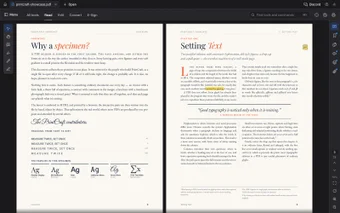
PdfCraft’s Read Mode lets you view two pages side by side, just like an open book, which makes long documents more comfortable to read. It’s also built to handle tricky content, such as complex scripts, vertical Japanese text, color emoji, and transparency. Search results show up as you type, so you can jump straight to what you need instead of scrolling through every page.
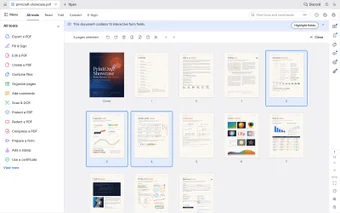
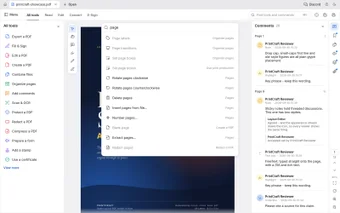
Organizing pages is easy, too. You can see every page of a file laid out like cards, then rotate, delete, insert, extract, or reorder them as needed. Comments are just as handy. You can add notes to a document and see them all in one place, which makes it easy to go back and review feedback later without hunting through the pages.
You can also do light editing, like inserting text, highlighting, and adding a signature, while autosave and crash recovery help protect your work. It’s still early in development, though, so expect rough edges. Moving inserted images around can get glitchy, and some features, like changing the background color, might not work well. You can install it standalone or through the ArtCraft Launcher, which keeps it updated.
Early days, but a promising start
PdfCraft is a good fit for anyone who wants a free PDF tool for the basics without signing up for anything, especially if privacy matters to you. What sets it apart is that it’s fast and stable while staying open source and local. It’s not perfect yet, and the editing side still needs polish, but for everyday documents it’s a pretty decent option.